

还在为每天数万条告警头疼?看我如何用LLM让运维效率提升10倍
作者:佚名 时间:2025-11-13 08:15
近来留意到诸多技术团队着手探寻大模型于实际业务里的落地情形,特别是在运维这个看似传统、实则急需效率突破的范畴,AI的介入正默默改变着工程师们处理系统告警的日常。身为长期关注AI应用落场的观察者,我觉得这种把LLM与AIOps相结合的尝试,意味着运维工作正从“人工排查”迈向“智能协同”的新阶段。
告警洪流困境
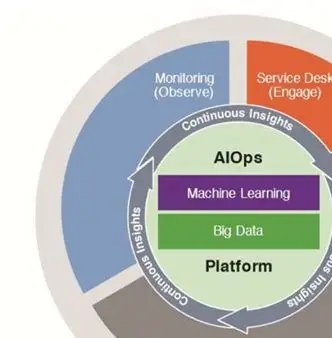
当下,大型互联网平台每日所产生的告警数量,已然突破十万量级。有某头部电商平台的运维负责人透露,在2024年促销季那段时期,其监控系统在单日捕获的告警事件数量达到了27万条,如此这般,致使传统人工筛选模式难以进行应对。
告警内容当中,既有结构化数据,又涉及大量非结构化文本。系统日志、业务指标、用户反馈等多源信息,需要运维工程师同时处理,而这种多模态数据混合的场景,进一步加大了分析的难度。
关联分析瓶颈
架构呈分布式时,单个故障会有可能触发数十个存在关联的告警。2023年,有一份某金融科技公司所做的事后分析报告表明,因为没能及时识别出数据库慢查询跟支付超时二者之间的关联,所以致使业务中断,这种中断持续了47分钟。
基于传统规则的关联分析方法,需预先去定义故障模式,新型微服务架构展现出的动态特性,致使规则维护成本急剧增加,这造成将近三成的复杂故障,因其无法借助既定规则及时发出预警 。
LLM语义解析
规模较大的语言模型于领会告警文本层面呈现出别具一格的优势。某家云服务商在2024年年初所开展的测试显示,经过专门设定训练的LLM能够确切辨认93%的告警语义,其中涵盖了针对模糊表述的关键信息提取。
模型借助对告警上下文予以分析,能够自行补足缺失的场景资讯。比如说处于出现“接口超时”告警这种状况时,系统会同步去调取相关服务的部署变更记载,进而形成完备的分析链路。
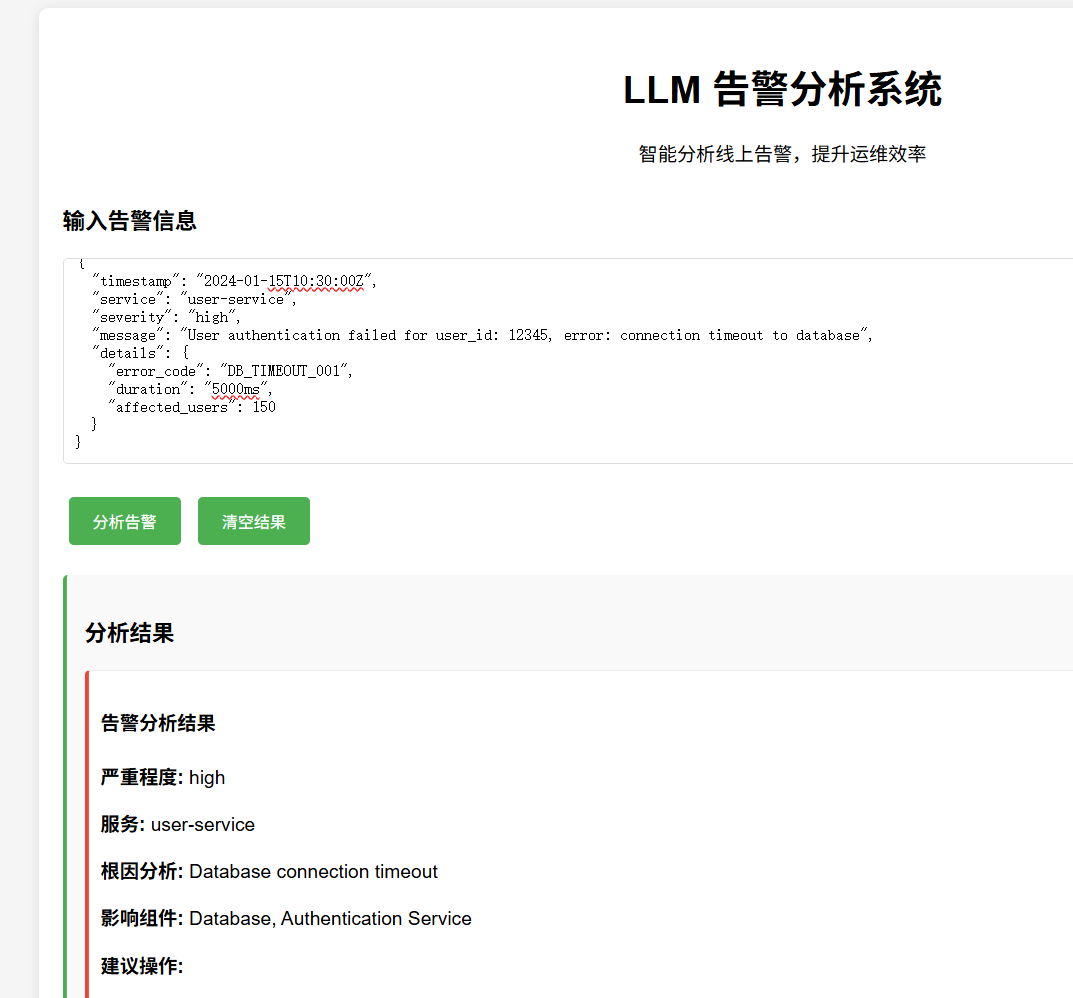
智能分级机制
<!DOCTYPE html>
<html>
<head>
<title>LLM告警分析系统</title>
<style>
body {
font-family: Arial, sans-serif;
margin: 0;
padding: 20px;
background-color: #f5f5f5;
}
.container {
max-width: 1200px;
margin: 0 auto;
background: white;
padding: 20px;
border-radius: 8px;
box-shadow: 0 2px 10px rgba(0,0,0,0.1);
}
.header {
text-align: center;
margin-bottom: 30px;
}
.input-section {
margin-bottom: 20px;
}
.input-area {
width: 100%;
height: 150px;
padding: 10px;
border: 1px solid #ddd;
border-radius: 4px;
font-family: monospace;
}
.button {
background-color: #4CAF50;
color: white;
padding: 10px 20px;
border: none;
border-radius: 4px;
cursor: pointer;
margin: 5px;
}
.button:hover {
background-color: #45a049;
}
.results {
margin-top: 20px;
padding: 15px;
background-color: #f9f9f9;
border-radius: 4px;
border-left: 4px solid #4CAF50;
}
.alert-item {
margin: 10px 0;
padding: 10px;
background-color: #fff;
border: 1px solid #eee;
border-radius: 4px;
}
.severity-high {
border-left: 4px solid #f44336; }
.severity-medium {
border-left: 4px solid #ff9800; }
.severity-low {
border-left: 4px solid #4CAF50; }
</style>
</head>
<body>
<div class="container">
<div class="header">
<h1>LLM 告警分析系统</h1>
<p>智能分析线上告警,提升运维效率</p>
</div>
<div class="input-section">
<h3>输入告警信息</h3>
<textarea id="alertInput" class="input-area" placeholder="请输入告警信息,支持JSON格式或文本格式...">{
"timestamp": "2024-01-15T10:30:00Z",
"service": "user-service",
"severity": "high",
"message": "User authentication failed for user_id: 12345, error: connection timeout to database",
"details": {
"error_code": "DB_TIMEOUT_001",
"duration": "5000ms",
"affected_users": 150
}
}</textarea>
<br><br>
<button class="button" onclick="analyzeAlert()">分析告警</button>
<button class="button" onclick="clearResults()">清空结果</button>
</div>
<div id="results" class="results" style="display: none;">
<h3>分析结果</h3>
<div id="analysisResult"></div>
</div>
</div>
<script>
function analyzeAlert() {
const input = document.getElementById('alertInput').value;
const resultsDiv = document.getElementById('results');
const analysisResult = document.getElementById('analysisResult');
// 模拟LLM分析过程
const alertData = parseAlertData(input);
const analysis = performLLMAnalysis(alertData);
analysisResult.innerHTML = generateAnalysisHTML(analysis);
resultsDiv.style.display = 'block';
}
function parseAlertData(input) {
try {
// 尝试解析JSON
return JSON.parse(input);
} catch (e) {
// 如果不是JSON,作为文本处理
return {
message: input,
severity: 'medium',
service: 'unknown'
};
}
}
function performLLMAnalysis(alertData) {
// 模拟LLM分析逻辑
const severity = alertData.severity || 'medium';
const service = alertData.service || 'unknown';
const message = alertData.message || alertData;
// 分析结果
return {
severity: severity,
service: service,
rootCause: identifyRootCause(message),
affectedComponents: identifyAffectedComponents(message),
suggestedActions: getSuggestedActions(message),
priority: calculatePriority(severity),
confidence: Math.floor(Math.random() * 30) + 70 // 70-100%
};
}
function identifyRootCause(message) {
const lowerMsg = message.toLowerCase();
if (lowerMsg.includes('timeout') || lowerMsg.includes('connection')) {
return 'Database connection timeout';
} else if (lowerMsg.includes('memory') || lowerMsg.includes('oom')) {
return 'Memory exhaustion';
} else if (lowerMsg.includes('disk') || lowerMsg.includes('space')) {
return 'Disk space insufficient';
} else if (lowerMsg.includes('cpu') || lowerMsg.includes('load')) {
return 'High CPU usage';
} else {
return 'Unknown issue - requires manual investigation';
}
}
function identifyAffectedComponents(message) {
const components = [];
const lowerMsg = message.toLowerCase();
if (lowerMsg.includes('database') || lowerMsg.includes('db')) {
components.push('Database');
}
if (lowerMsg.includes('cache') || lowerMsg.includes('redis')) {
components.push('Cache Layer');
}
if (lowerMsg.includes('api') || lowerMsg.includes('service')) {
components.push('API Gateway');
}
if (lowerMsg.includes('user') || lowerMsg.includes('auth')) {
components.push('Authentication Service');
}
return components.length > 0 ? components : ['Unknown Component'];
}
function getSuggestedActions(message) {
const actions = [];
const lowerMsg = message.toLowerCase();
if (lowerMsg.includes('timeout')) {
actions.push('Check database connection pool settings');
actions.push('Review database query performance');
actions.push('Verify network connectivity');
}
if (lowerMsg.includes('memory')) {
actions.push('Check application memory usage');
actions.push('Review garbage collection logs');
actions.push('Consider scaling up resources');
}
if (lowerMsg.includes('disk')) {
actions.push('Clean up old log files');
actions.push('Check disk usage and add storage if needed');
actions.push('Review log rotation settings');
}
return actions.length > 0 ? actions : ['No specific actions suggested - manual investigation required'];
}
function calculatePriority(severity) {
switch(severity.toLowerCase()) {
case 'high': return 'P1 - Critical';
case 'medium': return 'P2 - High';
case 'low': return 'P3 - Medium';
default: return 'P4 - Low';
}
}
function generateAnalysisHTML(analysis) {
let html = '';
html += `${
analysis.severity}">
告警分析结果
严重程度:
${
analysis.severity}
服务:
${
analysis.service}
根因分析:
${
analysis.rootCause}
影响组件:
${
analysis.affectedComponents.join(', ')}
建议操作:
`
;
analysis.suggestedActions.forEach(action => {
html += `${
action}`;
});
html += `
优先级:
${
analysis.priority}
置信度:
${
analysis.confidence}%
`;
return html;
}
function clearResults() {
document.getElementById('results').style.display = 'none';
document.getElementById('analysisResult').innerHTML = '';
}
</script>
</body>
</html>
以LLM为基础构建的告警分级系统,于众多个互联网公司当中获得了验证。某社交平台施行智能分级之后,高优先级告警识别具备的准确率,自百分之六十八提升到了百分之八十九,切实减小了重要告警被淹没的可能性。
此系统借助实地剖析告警内容、波及范围以及过往数据,灵活变动优先级评分来实行动态调整。运维团队能够依据评分结果恰当地分配处理资源,以此防止过度留意那些并非关键的告警发生 。
实战效能验证
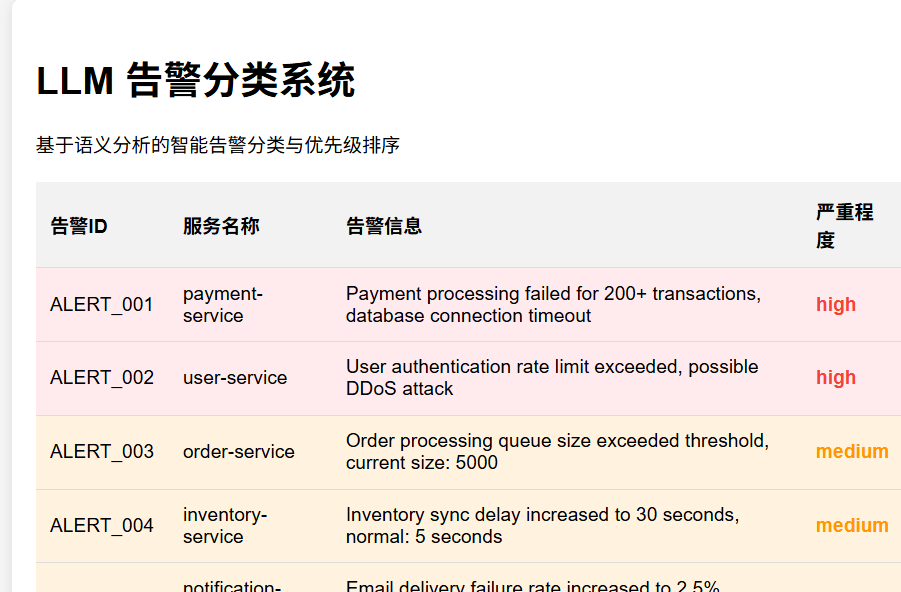
于近期某视频平台开展容量扩容之际,LLM辅助系统于3分钟之内识别出存储集群异常同CDN节点故障之间的关联性,传统方法则平均需25分钟方可构建此种跨系统关联 。
<!DOCTYPE html>
<html>
<head>
    <title>告警分类系统</title>
    <style>
        body {

            font-family: Arial, sans-serif;
            margin: 0;
            padding: 20px;
            background-color: #f5f5f5;
        }
        .container {

            max-width: 1000px;
            margin: 0 auto;
            background: white;
            padding: 20px;
            border-radius: 8px;
            box-shadow: 0 2px 10px rgba(0,0,0,0.1);
        }
        .classification-table {

            width: 100%;
            border-collapse: collapse;
            margin-top: 20px;
        }
        .classification-table th,
        .classification-table td {

            padding: 12px;
            text-align: left;
            border-bottom: 1px solid #ddd;
        }
        .classification-table th {

            background-color: #f2f2f2;
        }
        .severity-high {
    color: #f44336; font-weight: bold; }
        .severity-medium {
    color: #ff9800; font-weight: bold; }
        .severity-low {
    color: #4CAF50; font-weight: bold; }
        .priority-p1 {
    background-color: #ffebee; }
        .priority-p2 {
    background-color: #fff3e0; }
        .priority-p3 {
    background-color: #e8f5e8; }
    </style>
</head>
<body>
    <div class="container">
        <h1>LLM 告警分类系统</h1>
        <p>基于语义分析的智能告警分类与优先级排序</p>
        <table class="classification-table">
            <thead>
                <tr>
                    <th>告警ID</th>
                    <th>服务名称</th>
                    <th>告警信息</th>
                    <th>严重程度</th>
                    <th>优先级</th>
                    <th>分类</th>
                    <th>建议处理时间</th>
                </tr>
            </thead>
            <tbody id="alertTableBody">
                <!-- 动态生成的表格行 -->
            </tbody>
        </table>
    </div>
    <script>
        // 模拟告警数据
        const mockAlerts = [
            {

                id: 'ALERT_001',
                service: 'payment-service',
                message: 'Payment processing failed for 200+ transactions, database connection timeout',
                severity: 'high',
                priority: 'P1',
                category: 'Database',
                responseTime: 'Immediate'
            },
            {

                id: 'ALERT_002',
                service: 'user-service',
                message: 'User authentication rate limit exceeded, possible DDoS attack',
                severity: 'high',
                priority: 'P1',
                category: 'Security',
                responseTime: 'Immediate'
            },
            {

                id: 'ALERT_003',
                service: 'order-service',
                message: 'Order processing queue size exceeded threshold, current size: 5000',
                severity: 'medium',
                priority: 'P2',
                category: 'Queue',
                responseTime: '1 hour'
            },
            {

                id: 'ALERT_004',
                service: 'inventory-service',
                message: 'Inventory sync delay increased to 30 seconds, normal: 5 seconds',
                severity: 'medium',
                priority: 'P2',
                category: 'Sync',
                responseTime: '2 hours'
            },
            {

                id: 'ALERT_005',
                service: 'logging-service',
                message: 'Log rotation failed for access logs, disk space at 85%',
                severity: 'low',
                priority: 'P3',
                category: 'Logging',
                responseTime: '24 hours'
            },
            {

                id: 'ALERT_006',
                service: 'notification-service',
                message: 'Email delivery failure rate increased to 2.5%, normal: 0.1%',
                severity: 'medium',
                priority: 'P2',
                category: 'Notification',
                responseTime: '4 hours'
            }
        ];
        // 生成表格
        function generateAlertTable() {

            const tableBody = document.getElementById('alertTableBody');
            tableBody.innerHTML = '';
            // 按优先级排序
            const sortedAlerts = [...mockAlerts].sort((a, b) => {

                const priorityOrder = {
    'P1': 1, 'P2': 2, 'P3': 3 };
                return priorityOrder[a.priority] - priorityOrder[b.priority];
            });
            sortedAlerts.forEach(alert => {

                const row = document.createElement('tr');
                row.className = `priority-${
     alert.priority.toLowerCase()}`;
                row.innerHTML = `
                    ${
     alert.id}
                    ${
     alert.service}
                    ${
     alert.message}
                    ${
     alert.severity}">${
     alert.severity}
                    ${
     alert.priority}
                    ${
     alert.category}
                    ${
     alert.responseTime}
                `;
                tableBody.appendChild(row);
            });
        }
        // 页面加载时生成表格
        window.onload = generateAlertTable;
    </script>
</body>
</html>
此平台的运维总监讲道,智能分析系统把平均故障定位时间,缩减到了原本的四分之一。尤其是在应对跨地域部署的业务出现异常的状况时,系统呈现出比人工远远高出的分析效率。
实施路径建议
开展技术团队所建议的采用渐进式实施方案,首先要在测试环境构建能够作为告警依据事物的样本库,接着运用三至六个月的时长去完善模型对于相关事物的理解能力,之后再一步步地将其推广至生产环境 。
起始阶段的时候,应当去构建用人担任角色来再次核查核实的机制,如此这般才能够保障模型做出的输出结果具备可靠的性质。有一个从事制造行业的数字化团队,采用了双轨同时运行的模式,在连贯不间断的30天时间里,都没有出现差错的情况进行分析之后,才把LLM分析得出的结果归入到决策的流程里面。
在实际工作里,各位技术同仁有没有碰到过让你记忆深刻的告警分析实例呢?欢迎于评论区把你的实战经历分享出来,同时也期望知晓更众多行业在智能运维这方面的创新实践情况。要是感觉本文对你有启发作用,那就请点赞给予支持且分享给更多有需求的伙伴 。
<!DOCTYPE html>
<html>
<head>
    <title>告警关联分析系统</title>
    <style>
        body {

            font-family: Arial, sans-serif;
            margin: 0;
            padding: 20px;
            background-color: #f5f5f5;
        }
        .container {

            max-width: 1200px;
            margin: 0 auto;
            background: white;
            padding: 20px;
            border-radius: 8px;
            box-shadow: 0 2px 10px rgba(0,0,0,0.1);
        }
        .graph-container {

            height: 500px;
            border: 1px solid #ddd;
            margin: 20px 0;
            position: relative;
        }
        .node {

            position: absolute;
            width: 120px;
            height: 60px;
            border: 2px solid #333;
            border-radius: 8px;
            display: flex;
            align-items: center;
            justify-content: center;
            text-align: center;
            font-size: 12px;
            cursor: pointer;
            transition: all 0.3s;
        }
        .node:hover {

            transform: scale(1.05);
            box-shadow: 0 4px 8px rgba(0,0,0,0.2);
        }
        .node.root {

            background-color: #ffebee;
            border-color: #f44336;
        }
        .node.service {

            background-color: #e3f2fd;
            border-color: #2196f3;
        }
        .node.database {

            background-color: #e8f5e8;
            border-color: #4caf50;
        }
        .node.network {

            background-color: #fff3e0;
            border-color: #ff9800;
        }
        .edge {

            position: absolute;
            background-color: #666;
            transform-origin: 0 0;
            z-index: -1;
        }
        .legend {

            display: flex;
            gap: 20px;
            margin: 20px 0;
            flex-wrap: wrap;
        }
        .legend-item {

            display: flex;
            align-items: center;
            gap: 5px;
        }
        .legend-color {

            width: 20px;
            height: 20px;
            border-radius: 4px;
        }
    </style>
</head>
<body>
    <div class="container">
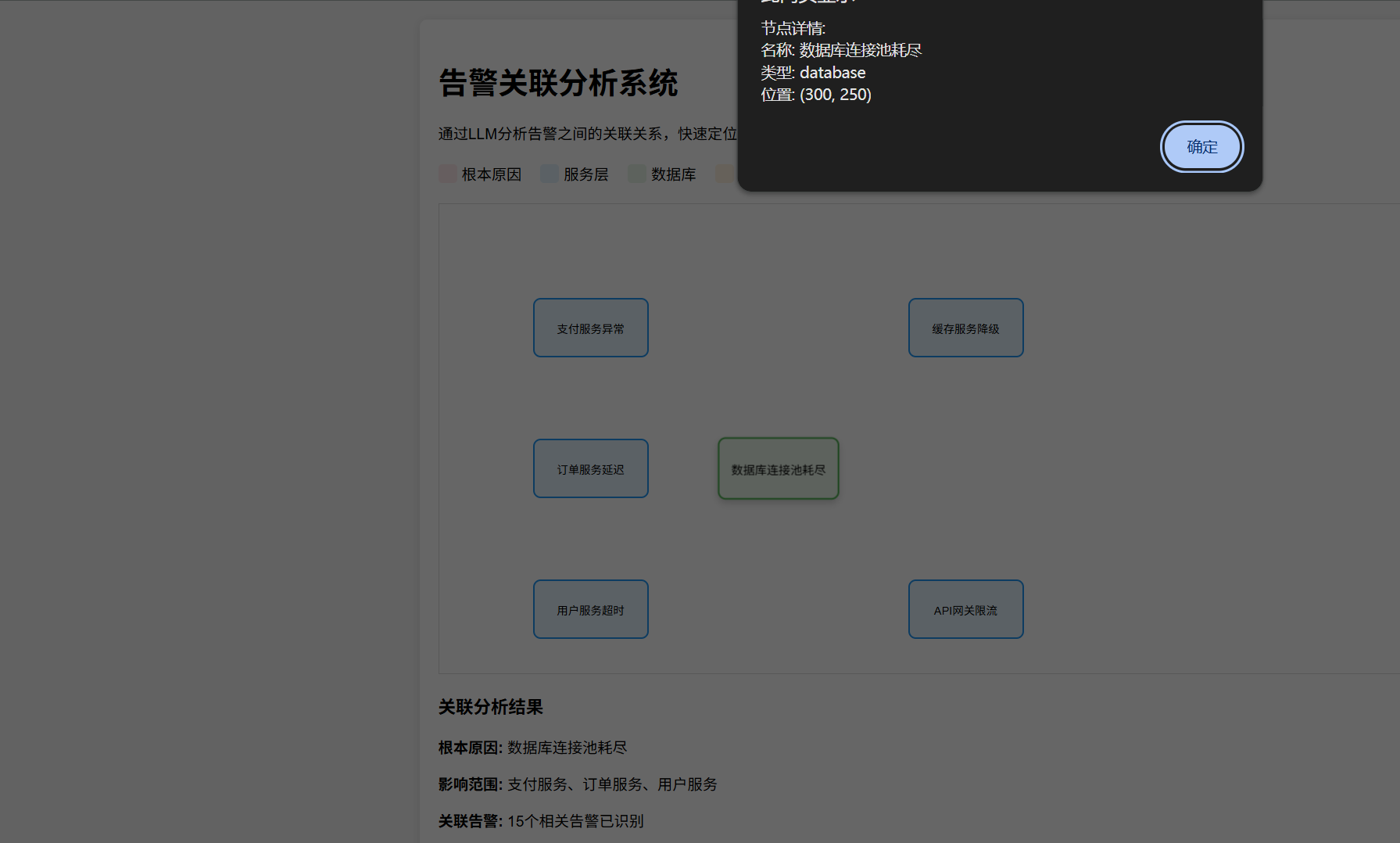
        <h1>告警关联分析系统</h1>
        <p>通过LLM分析告警之间的关联关系,快速定位根本原因</p>
        <div class="legend">
            <div class="legend-item">
                <div class="legend-color" style="background-color: #ffebee;"></div>
                <span>根本原因</span>
            </div>
            <div class="legend-item">
                <div class="legend-color" style="background-color: #e3f2fd;"></div>
                <span>服务层</span>
            </div>
            <div class="legend-item">
                <div class="legend-color" style="background-color: #e8f5e8;"></div>
                <span>数据库</span>
            </div>
            <div class="legend-item">
                <div class="legend-color" style="background-color: #fff3e0;"></div>
                <span>网络</span>
            </div>
        </div>
        <div class="graph-container" id="graphContainer">
            <!-- 节点和边将通过JavaScript动态生成 -->
        </div>
        <div class="analysis-results">
            <h3>关联分析结果</h3>
            <div id="analysisText">
                <p><strong>根本原因:</strong> 数据库连接池耗尽</p>
                <p><strong>影响范围:</strong> 支付服务、订单服务、用户服务</p>
                <p><strong>关联告警:</strong> 15个相关告警已识别</p>
                <p><strong>建议措施:</strong> 扩大数据库连接池配置,优化慢查询</p>
            </div>
        </div>
    </div>
    <script>
        // 告警关联图数据
        const graphData = {

            nodes: [
                {
    id: 'db', name: '数据库连接池耗尽', type: 'database', x: 300, y: 250 },
                {
    id: 'payment', name: '支付服务异常', type: 'service', x: 100, y: 100 },
                {
    id: 'order', name: '订单服务延迟', type: 'service', x: 100, y: 250 },
                {
    id: 'user', name: '用户服务超时', type: 'service', x: 100, y: 400 },
                {
    id: 'cache', name: '缓存服务降级', type: 'service', x: 500, y: 100 },
                {
    id: 'api', name: 'API网关限流', type: 'service', x: 500, y: 400 }
            ],
            edges: [
                {
    from: 'db', to: 'payment' },
                {
    from: 'db', to: 'order' },
                {
    from: 'db', to: 'user' },
                {
    from: 'payment', to: 'cache' },
                {
    from: 'order', to: 'api' }
            ]
        };
        function renderGraph() {

            const container = document.getElementById('graphContainer');
            container.innerHTML = '';
            // 创建节点
            graphData.nodes.forEach(node => {

                const nodeElement = document.createElement('div');
                nodeElement.className = `node ${
     node.type}`;
                nodeElement.style.left = `${
     node.x}px`;
                nodeElement.style.top = `${
     node.y}px`;
                nodeElement.textContent = node.name;
                nodeElement.title = `点击查看详情: ${
     node.name}`;
                nodeElement.addEventListener('click', () => {

                    alert(`节点详情:\n名称: ${
     node.name}\n类型: ${
     node.type}\n位置: (${
     node.x}, ${
     node.y})`);
                });
                container.appendChild(nodeElement);
            });
            // 创建边
            graphData.edges.forEach(edge => {

                const fromNode = graphData.nodes.find(n => n.id === edge.from);
                const toNode = graphData.nodes.find(n => n.id === edge.to);
                if (fromNode && toNode) {

                    const edgeElement = document.createElement('div');
                    edgeElement.className = 'edge';
                    const length = Math.sqrt(
                        Math.pow(toNode.x - fromNode.x, 2) +
                        Math.pow(toNode.y - fromNode.y, 2)
                    );
                    const angle = Math.atan2(
                        toNode.y - fromNode.y,
                        toNode.x - fromNode.x
                    ) * 180 / Math.PI;
                    edgeElement.style.width = `${
     length}px`;
                    edgeElement.style.height = '2px';
                    edgeElement.style.left = `${
     fromNode.x}px`;
                    edgeElement.style.top = `${
     fromNode.y}px`;
                    edgeElement.style.transform = `rotate(${
     angle}deg)`;
                    container.appendChild(edgeElement);
                }
            });
        }
        // 页面加载时渲染图表
        window.onload = renderGraph;
    </script>
</body>
</html>



;)
凭借自然语言处理优势,能理解告警语义、进行智能分类和关联,提升问题定位效率。实战案例显示,LLM辅助分析将问题定位时间缩短至5-15分钟,准确率达85-95%,效率提升400%以上。优势在于语义理解强、上下文感知、自适应');)
;)
凭借自然语言处理优势,能理解告警语义、进行智能分类和关联,提升问题定位效率。实战案例显示,LLM辅助分析将问题定位时间缩短至5-15分钟,准确率达85-95%,效率提升400%以上。优势在于语义理解强、上下文感知、自适应');)